

 EMMA FOR SALESFORCE · GUIDE
Invocable actions.
Put Emma to work in Salesforce Flow.
Manage audience members and start Import Wizard jobs from your automation.
In this guide
Salesforce Flow Builder allows you to build complex automation without code.
Emma for Salesforce provides Actions that work with flow, allowing you to:
- Add a contact or lead to an Emma group
- Remove a contact or lead from an Emma group
- Delete a contact or lead from Emma
- Start an import wizard
Flows are a very advanced Salesforce feature. They should be fully understood outside of our integration before using. Although we provide invocable actions, we don't support flows.
Invocable Actions
To use one of our actions, search for Emma. All of our actions will appear.

Instant import wizard
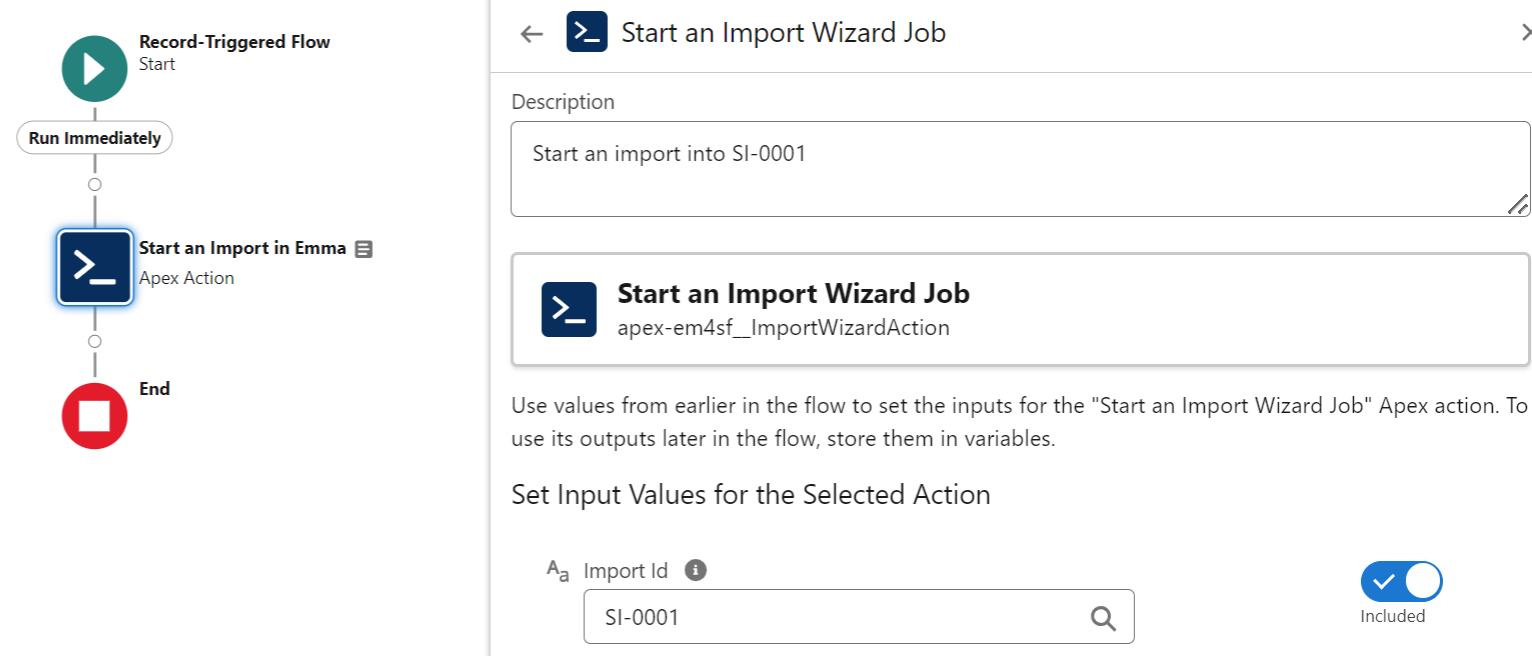
The instant import wizard invokable action allows you to start an import based on a flow. When the flow is triggered, the import will start instantly. If you don't already have an import setup first Create one. Once the import is setup you will see the import ID i.e. SI-0001 take a note of this ID.
In the Action search, search for Start an Import Wizard Job.
In the action, there is only one variable which is called Import ID. The type is String, the value will be the ID you copied down earlier. See the screenshot below for an example.
Salesforce Web-to-Lead
Bring website sign-ups into Salesforce and Emma.
